Translate this blog


Get Facebook Timeline

0

Step 1: Visit this website: www.facebook.com/about/timeline
Step 2: Click the GREEN button [ Get Timeline ]
Step 3: Wait for few seconds & you will get Facebook Timeline interface.
[ Please Note: Timeline will be officially available for all FB users 22nd December 2011 onwards ] 

Internet Download Manager Full Version

0

New! Internet Download Manager v6.07. Fixed compatibility problems with different browsers including Internet Explorer 9 Final, Mozilla Firefox 4, Mozilla Firefox 5, Mozilla Firefox 6 and Mozilla Firefox 7, Google Chrome. Improved FLV grabber to save videos from web players on YouTube, WOW!Google Video,MySpace TV, and other popular sites

Internet Download Manager (IDM) is a tool to increase download speeds by up to 5 times, resume and schedule downloads. Comprehensive error recovery and resume capability will restart broken or interrupted downloads due to lost connections, network problems, computer shutdowns, or unexpected power outages. Simple graphic user interface makes IDM user friendly and easy to use.Internet Download Manager has a smart download logic accelerator that features intelligent dynamic file segmentation and safe multipart downloading technology to accelerate your downloads. Unlike other download managers and accelerators Internet Download Manager segments downloaded files dynamically during download process and reuses available connections without additional connect and login stages to achieve best acceleration performance.
Internet Download Manager supports proxy servers, ftp and http protocols, firewalls, redirects, cookies, authorization, MP3 audio and MPEG video content processing. IDM integrates seamlessly into Microsoft Internet Explorer, Netscape, MSN Explorer, AOL, Opera, Mozilla, Mozilla Firefox, Mozilla Firebird, Avant Browser, MyIE2, and all other popular browsers to automatically handle your downloads. You can also drag and drop files, or use Internet Download Manager from command line. Internet Download Manager can dial your modem at the set time, download the files you want, then hang up or even shut down your computer when it's done.

Other features include multilingual support, zip preview, download categories, scheduler pro, sounds on different events, HTTPS support, queue processor, html help and tutorial, enhanced virus protection on download completion, progressive downloading with quotas (useful for connections that use some kind of fair access policy or FAP like Direcway, Direct PC, Hughes, etc.), built-in download accelerator, and many others.
Version 6.07 adds IDM download panel for web-players that can be used to download flash videos from sites like YouTube, MySpaceTV, and Google Videos. It also features complete Windows 7 and Vista support, YouTube grabber, redeveloped scheduler, and MMS protocol support. The new version also adds improved integration for IE and IE based browsers, redesigned and enhanced download engine, the unique advanced integration into all latest browsers, improved toolbar, and a wealth of other improvements and new features.
Full version of IDM
Awards

CNet
Top Rated.

ZDNet
Editors pick.

Cnet Rating
Most Popular.

volftp.mondadori.com
Awards 2003.

Download.com
Editors pick.


Download.com
5/5 rating.


GlobalShareware.com
5/5 rating.

Bluechillies.com
5/5 rating.

The file transit
5/5 rating.

TopShareware.com
5/5 rating.

Boost Your Wireless Router Signal

0

Look at it – staring you down so innocently, yet I know that your Linksys wireless router refuses to give you signal. Since you decided to place it in a corner to gather dust, using it only for its relay capabilities, it has decided to constantly bring up the feared “Limited Network Connection” bubble. Don’t you just hate those?
These routers have the power to transmit intangible signals; these signals, powerful as they may be, are prone to constant interference whether it be by physical objects, other signals floating around in the air, or even because you didn’t plug the wire in all the way.
Regardless of what the issue, there are some proven ways to try to remedy the situation of a weak Wifi signal. Some may simply be a little bit of common sense, other methods require purchasing additional parts.
Here are 8 tips on how to boost your wireless router signal.

Position it better
Unless you are living in a cave and you somehow miraculously have internet connectivity at the same time, you probably figured out that if your wireless router was in the corner of your kitchen under a pile of old newspapers and your computer was located on the second floor on the opposite side of the house — it is a great idea to place your router in an open position (preferably in the center of your house) where it isn’t obstructed by dense or metallic objects such as file cabinets or brick walls.

Change the WiFi Channel
Generally, Wifi routers transmit their signals on a radio frequency of 2.4 GHz. Many other household objects may operate on or around the same frequency, like cordless phones, for example. So, the channel becomes bogged down over time with lots of excess traffic that slows down your wireless connection. In the U.S., routers have a predefined set of 11 channels, and the default on a lot of them is channel 6. Changing the channel would reduce some interference. So how do you change the channel?
A great utility many people use is called NetStumbler, a wireless networking tool that just so happens to offer the option for you to change your wifi channel. Once opened, the program gives the choice of fooling around with all of your wireless utilities. Here is where you change your channel:

Which leads to:

Since the default for most people (at least in the United States) is 6, you may want to change your channel to something like say, channel 11. Take note that the changing of your wireless channel will NOT in any way increase your speed or bandwith. It will simply remedy your network connection if it keeps breaking off or getting lost.


Update firmware or drivers
Updates, whether related to the router firmware or your computer’s network adapter are done to fix bugs, smoothen out performance and reliability, and maybe even add new features. It is always a good idea to stay up to date with the latest releases by either of these parties.
Tim suggested using RadarSync to easily automatically update your computer’s drivers at once.

Buy your equipment from the same company
Compatibility can be a big problem, especially for two way transmissions. It may help to purchase your adapter and your router – everything, from the same company. Aside from that, some companies have embedded enhancements that improve speed or signal strength when everything is under the same brand.

Replace your antenna
Most routers come equipped with something called an omnidirectional antenna. This means that the antenna attached to the router broadcasts the signal equally within a certain circular radius. This is great if the router is positioned in the center of a hub where it needs to be able to reach ever corner of a room, but it can prove to be extremely wasteful if your router is in the corner (then again, why would it be there in the first place?). Since the signal is transmitted in a radius, if you place it in a corner, a lot of the transmitted signal is sent into the wall or outside into the open.
That is why you can manually detach your antenna and replace it with a high gain antenna. This focuses its energy to direct the signal in one general direction. Simple enough? You may have to check and see if your router has an external antenna jack/removable antenna.

Replace your wireless adapter
Since this is a two-way transmission, it may not have occured to you that it may not be the router that is the problem, but actually the wireless adapter attached to your computer. If your computer cannot send signals back to the router, the same problem ensues.
What is an adapter? It used to be the card that you inserted into your computer or laptop. These days, most of the adapters are in the form of USB devices. Consider switching to a USB adapter that houses an external antenna, like this one depicted below.

This is usually only applicable to desktop computers. If you purchased a laptop that has a built-in adapter, it probably isn’t your adapter because they are usually very high quality installations.

Add an additional Wireless Access Point (WAP) or Repeater
If all else fails, you may need to purchase a repeater or a secondary Wireless Access Point. The consensus among these two options is rather mixed. Constructing a secondary WAP requires the ability to feed an ethernet cable from your primary router to the new access point. There are also cost considerations to be aware of, as WAPs cost more than regular wireless routers. Even so, WAPs have certain flexibilities that normal routers do not have. They can be configured as gateways, bridges, clients or repeaters. But that’s another story. The bottom line is that the WAP is an extension of the original hub in order to extend the distance of the signal. The repeater works the same way.
Here is a tutorial on how to set up the WAP courtesy of Techskillsvideos:

Try weird things
Apparently aluminum foil amplifies reception and transmission. It may or may not work, YMMV


A little bit of background: You may have seen 802.11b or 802.11g written somewhere on your router – these are merely wireless LAN standards that the particular router adheres to. The main difference between these is that 802.11b has a maximum data transfer rate of 11 Mbps, whereas 802.11g has a much higher 54 Mbps rate.
With that being said, there is no way to improve data transmission or bandwith outside of hardware applications and upgrades. The tips mentioned above are meant to help you solve the problem of an interfered or weak signal. These may or may not work for you, but there is a strong correlation between troubleshooting and success rate.

Convert Any Video Extension to DVD

0

Features :

Video Converter


  • Convert videos to DVD and watch on any DVD player
    Convert Avi to DVD, DivX to DVD, WMV to DVD, RM to DVD, YouTube to DVD etc. . . .
  • Burn automatically to DVD after video conversion
  • Excellent quality and fast converter


Getting started open the program and it will look like this:


Now of course you want to start converting right away so all your settings should be alright since you configured them more less during installation, push the green button that has a white "+" in the middle of it (circled in the picture)


Now its time to locate and add your file:

Notice that the "Files of Type" drop box says "All Supported Files" make sure it stays like that so you know what files the program can handle and which ones it cant!


Before we customize we must know what the different "DVD Options" mean:

"Auto Start Playback" is used if you want your dvd to start automatically without going to a menu what you often see usually with dvd's bought at stores they start playing..

"Loop Playback" is just that, a repeate or if you have multiple movies then the first movie will play as soon as the last one is done.

"Play titles one after another" is used when you have multiple videos on one dvd and you want them to play one after another that way you dont have to go back to the title screen and choose the next video to play (very essential, but does take a min or so to transition between tracks so it will appear your dvd is lagging or stopped but it really hasnt its just stopping that clip and starting the other one where that one left off )

“Skip root menu initially” is when a title is selected from the title (main) menu, it will play the title directly and skip the root menu.

“Return to title menu after titleset playback” is the option when a title finishes playing, the dvd will go back to the title (main) menu instead of the root menu, although this option is ignored if there is no title menu.

“Don’t create title menu for single video” with this option selected a title menu will not be created with one video.


Now to finish customizing and preview the video (actually before you convert all your previewing is the title screen):

To customize the "Title" or "Background" all you have to do is double click on the name and it will either let you type in that space (title) or it will let you search your computer for a picture (background).. After you have done both of these you will want to click on the lil icon that looks like a tv screen to open the video preview (it is circled in pic), that way you can see and set everything to your liking!


Converting:

Once everything is set all you do is push Convert in the bottom right hand corner of the program and it will do its job!!! Make sure you have a blank dvd+r/-r/dual layer depending on what your burning because once its done converting it will automatically burn the files onto dvd and it only give a 10 second grace period so its always good to have your blank media in your drive that way you can click convert and go do whatever you have to do and come back and find your dvd burner tray popped out with your new movie waiting to be watched!!!


This concludes my ConvertXToDVD guide, i hope its understandable to all and i hope everyone sees how strong this easy program is!! I will be more than glad to answer any questions if you have any and will update if people want more information i didnt cover so please dont be shy to ask questions!!!

Almost forgot, you dont have the program do you? You need it dont you? Well lucky for you SLUGGER posted the most current version in Direct Download form on here a while ago so go and download it now!!!

Download ConvertXtoDVD
This is the Serial Key :
VN5VU-5RNEY-NY7FA-DGPH2-47D9K-U

QVB4R-QR3L3-AHNW4-FH9GW-JQYC9-B

AQ2H3-SWBX3-X9FL7-JQXQ3-7NNYS-4

V2TKU-WFJMJ-8DJNZ-BLK7E-7T2FQ-A

WE65R-P5RC9-RMCPF-YVPXV-HKYY7-4

B86NV-PTETW-7V58Y-YWSPM-DP53A-L

HVR6W-GXMAC-AZ2Q5-XKQWV-JLN2T-2

AJKX2-8CN24-TFZ2A-NA5VE-GBTD8-B

FCR9C-PH96T-QK3W5-N37BG-W5BFX-J

XVCDR-XMSWF-JEHSH-4Z69F-VTS2W-T

RNCV3-8VCU5-FMKQ5-M2CD2-8MFMV-4

5WTQQ-4DB79-HBEMK-BXA23-FJ9SC-3

KZRUL-6Y4FR-ZULYN-P9VQ3-4K6KS-3

3L9LF-N8T2T-JFBGS-JU89N-MSU68-4

9XKNQ-TQUM6-W2PGH-Z4GP2-T7RZ4-4

EHJ66-FJBXM-MJ6W2-ZPDNN-KAR39-4

EKXLU-69N3X-7BHS8-7Q9MN-9NL7T-4

6TPVK-PYAR2-SC36L-RNF7Y-WYQD8-3

H372M-TWADS-PE696-C9X86-8CZCR-3

CZ7QL-KJ8SF-ADC94-RMKJF-ZVZYF-3


Credits to www.Google.com for the Images

Make Internet Download Faster - 140kb/s

0


First, you must make sure that you have ADSL Moderm you get from ISP (Steramyx Only).


Open Command Prompt in the Computer / Laptop you. Write the word below:
ipconfig /all
Search for 'Default Gateway' on the Command Prompt.

Example : my Default Gateway is 192.168.1.1


So, now we need to Access to your ADSL/Moderm.


Go to Setup at the Top, Click Setup Wizard


Streamyx ID :
Streamyx Password :
Protocol :
Connection Type :

After you enter to the Setup. Enter this detail . Make sure it Match :)

Streamyx ID : cye1128@streamyx
Streamyx Password : 531128
Protocol : PPPoE
Connection Type : Vc-Mux


Setup your Wireless Name & Wireless Password.
It will reboot your Moderm Automatic . It May Take time . So, be patient


Enjoy your Download with 140kb/s


Need More Streamyx Account?
Go to [LIST] Hacked Streamyx Username / Password [LIST]

=)

ASP Shell Maker (WebDAV)

4


You must have heard about WebDAV right?
Now, D3X MY want to share a WebDAV tools. It makes your job easier.
By simply pressing the "Serang!!!"


Sprawd now, they will show you how to use the tool.
Procedure :

after you open the rootkit, press the 'WebDAV' and select 'ASP Shell Maker'


add site by clicking "Add site" after the input http://bbs.nan-gang.gov.cn/


after you add a site, click on "Settings" to setting up your shell.
there is also provided ASP suda shell. If you want to also call your own shell just press "Load Shell From File". After you finished with your shell, press the Attack!

If you have successfully grown shell it will issue a "shell created!"
If that fails, it is not.

Example Shell planted by the D3X MY

Advanced Deface Page Creator

0

A website defacement is an attack on a website that changes the visual appearance of the site or a webpage. These are typically the work of system crackers, who break into a web server and replace the hosted website with one of their own.
The most common method of defacement is using SQL Injections to log on to administrator accounts. Defacements usually consist of an entire page. This page usually includes the defacer's pseudonym or "Hacking Codename." Sometimes, the Website Defacer makes fun of the system administrator for failing to maintain server security. Most times, the defacement is harmless, however, it can sometimes be used as a distraction to cover up more sinister actions such as uploading malware or deleting essential files from the server.
A high-profile website defacement was carried out on the website of the company SCO Group following its assertion that Linux contained stolen code. The title of the page was changed from "Red Hat v. SCO" to "SCO vs World," with various satirical content following.


Features :


  • Choose Sitetitle
  • Write down some texts
  • Create an error
  • Fade-in a picture
  • Background music
  • Javascript box
  • Funny circle around the curser
  • Choose textcolor
  • Choose backgroundcolor
  • Hide Sourcecode


Download Link :

Havij v1.15 (Advanced SQL Injection Tools)

0
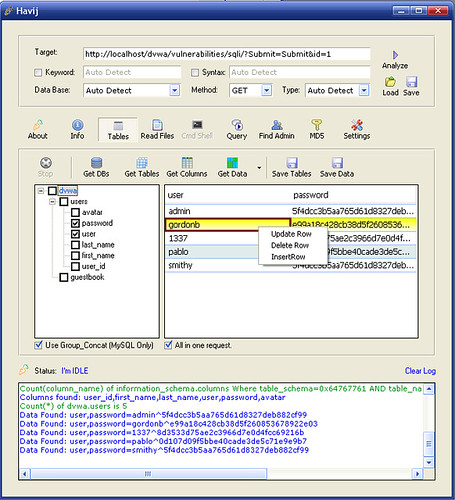
Havij is an automated SQL Injection tool that helps penetration testers to find and exploit SQL Injection vulnerabilities on a web page.
It can take advantage of a vulnerable web application. By using this software user can perform back-end database fingerprint, retrieve DBMS users and  password hashes, dump tables and columns, fetching data from the database, running SQL  statements and even accessing the underlying file system and executing commands on the  operating system.
The power of Havij that makes it different from similar tools is its injection methods. The success rate is more than 95% at injectiong vulnerable targets using Havij.
The user friendly GUI (Graphical User Interface) of Havij and automated settings and detections makes it easy to use for everyone even amateur users.


What's New?


  • Webknight WAF bypass added.
  • Bypassing mod_security made better
  • Unicode support added
  • A new method for tables/columns extraction in mssql
  • Continuing previous tables/columns extraction made available
  • Custom replacement added to the settings
  • Default injection value added to the settings (when using %Inject_Here%)
  • Table and column prefix added for blind injections
  • Custom table and column list added.
  • Custom time out added.
  • A new md5 cracker site added
  • bugfix: a bug releating to SELECT command
  • bugfix: finding string column
  • bugfix: getting multi column data in mssql
  • bugfix: finding mysql column count
  • bugfix: wrong syntax in injection string type in MsAccess
  • bugfix: false positive results was removed
  • bugfix: data extraction in url-encoded pages
  • bugfix: loading saved projects
  • bugfix: some errors in data extraction in mssql fixed.
  • bugfix: a bug in MsAccess when guessing tables and columns
  • bugfix: a bug when using proxy
  • bugfix: enabling remote desktop bug in windows server 2008 (thanks to pegasus315)
  • bugfix: false positive in finding columns count
  • bugfix: when mssql error based method failed
  • bugfix: a bug in saving data
  • bugfix: Oracle and PostgreSQL detection

Link to Download:

Download
Download
How to use:
This tool is for exploiting SQL Injection bugs in web application.
For using this tool you should know a little about SQL Injections.
Enter target url and select http method then click Analyze.
Note: Try to url be valid input that returns a normal page not a 404 or error page.

If you need password, go here